
A database, sign-in and secrets
Most sites need to remember things: orders, bookings, sign-ups, messages from a contact form. The Assets tab, behind Files, is where your site keeps them, and setting it up spends no credits.
Open a project, press Files in the header and choose Assets. There are three sections.
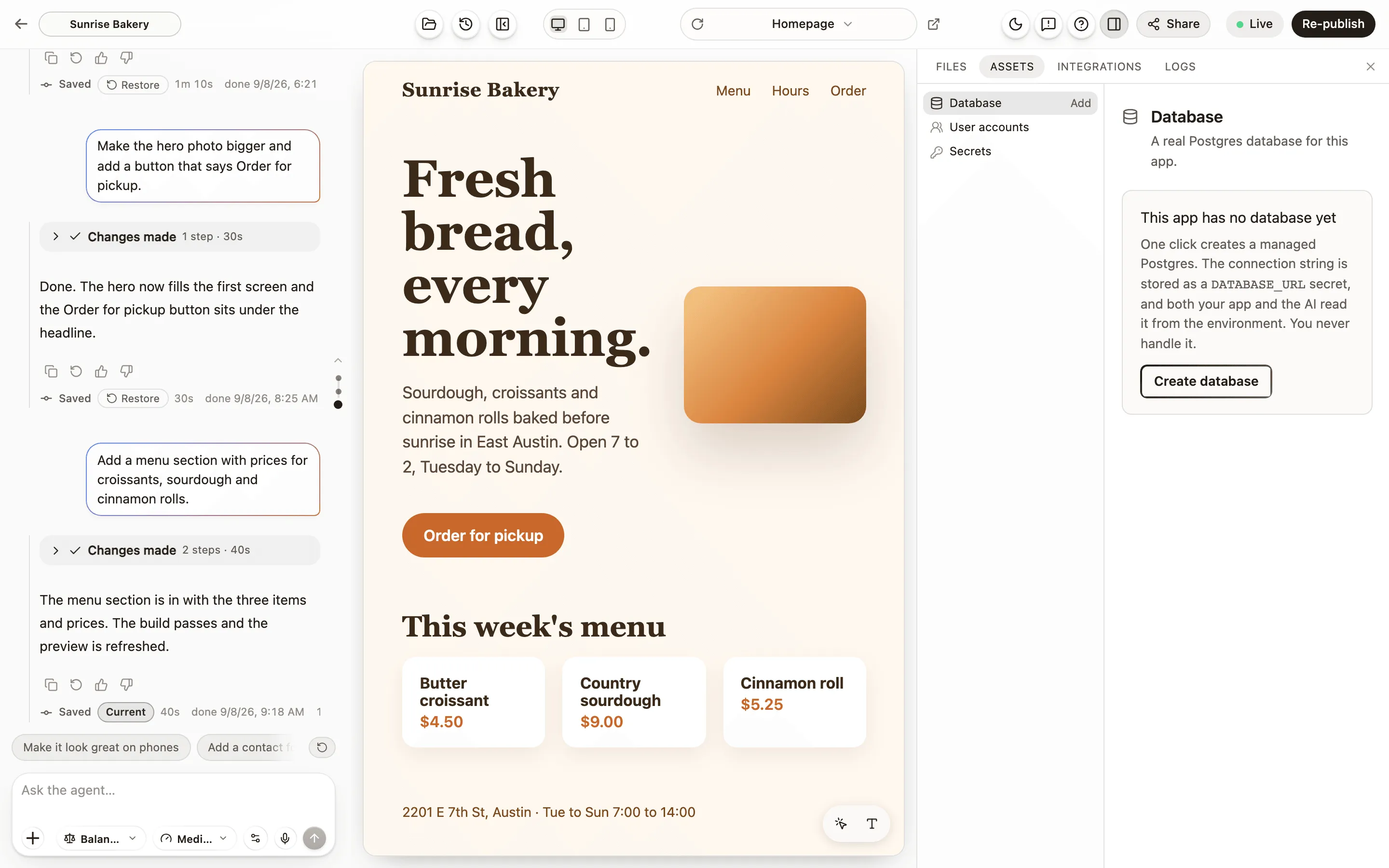
Database
Section titled “Database”Create database gives your site a real Postgres database with one click. The connection details are stored as a write-only secret, and both your site and Anela AI read them from the environment when the code runs. You never see or paste them. Once it exists, the section starts with What’s in your database: each table with how many entries it has; open one to see up to 50 of its newest entries, such as your latest orders or messages. Once your site is published it shows the live site’s data, and you can switch to the preview’s. The provider, the region and the other technical details are further down.
Ask Anela AI for what you want stored, for example “save every booking with the name, the date and the number of guests, and show me a list of them on a private page”, and it creates the tables and writes the code. You can ask for the structure to change later the same way.
Two things to know:
- Browser access. When it is on, the published site reads data directly from the database, with no server in between, which is what makes a live list of bookings work. The tab says whether it is on.
- A restore never touches your data. A restore puts your code back, not your rows. Data deleted by mistake comes back from the Data tab in Checkpoints. For a change that alters how data is stored, ask for a plan first and read it. Checkpoints and restore.
Download data in the Database section gives you your data in one zip: every table as a spreadsheet file, the people who signed up (never their passwords) and a full backup for any Postgres database. Choose the live site or the preview, now or as it was at a moment. The code’s downloaded zip carries the structure of the tables, not the rows.
User accounts
Section titled “User accounts”User accounts lets the visitors of your site sign up and log in, with an email and a password or with Google, hosted for you. Ask Anela AI for a login page, a members area or a section only signed-in visitors can see, and it wires your site to the service. Visitor accounts live with the database: removing the database removes them too.
Once sign-in is on, the section lists People who signed up, newest first, with the date and whether they confirmed their email (never their passwords).
These are your visitors’ accounts, not your Anela account. Your account is about the latter.
Secrets
Section titled “Secrets”Secrets is the vault for API keys and other values your site reads when it runs: a key for a maps service, a token for a newsletter tool, anything a service gave you. Paste the value once and it is saved write-only: it can be replaced or removed, but never read back, not even by you.
Anela AI can use a saved secret while it works on that project, because that is what lets your site reach the service. So use keys you can rotate, and if one may have been seen by someone who should not have seen it, replace it at the service that issued it. Saved secrets never go in the downloaded zip.
Email and payments have their own panels in the Integrations tab and do not need a key pasted here. Send email from your site. Take payments on your site.
Verified against the product on 2026-09-24.